
How to Download Latest PSSR Certificate PDF: Step-by-Step Procedure
Introduction
If you have completed the latest PSSR Amendment 2026 course, you need to download your certificate PDF and keep it safely with your Basic Safety Training / PSSR certificate.
Many seafarers complete the course but get confused about where to download the certificate, when it becomes available, and what details are required. In this blog, we will explain the complete step-by-step procedure to download the latest PSSR certificate PDF online.
What Is the Latest PSSR Certificate?
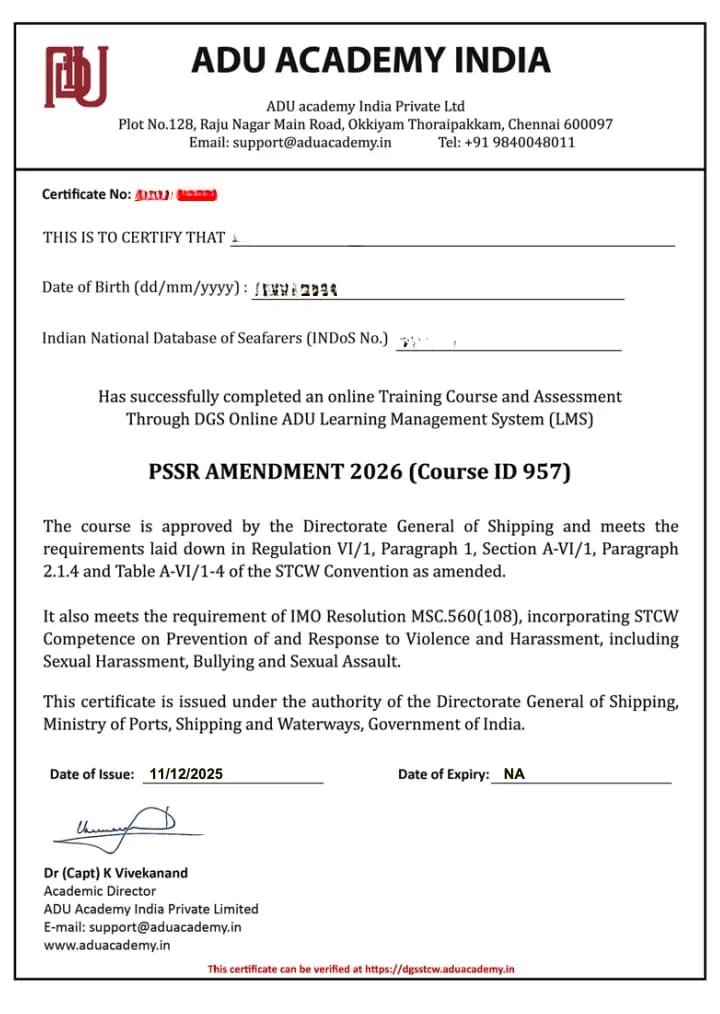
PSSR stands for Personal Safety and Social Responsibilities. The latest PSSR update is related to the PSSR Amendment 2026, which includes training on prevention and response to violence, harassment, sexual harassment, bullying, and sexual assault onboard ships.
Seafarers who already have PSSR/BST may be required to complete the updated e-learning module and download the course completion certificate.
Who Needs to Download the PSSR Amendment 2026 Certificate?
You may need to download this certificate if:
You are an existing seafarer.
You already have Basic Safety Training or PSSR.
You have completed the PSSR Amendment 2026 e-learning course.
You are joining a vessel on or after the applicable date.
Your company or institute has asked you to submit the latest PSSR certificate PDF.
Details Required to Download the PSSR Certificate PDF
Before starting the download process, keep these details ready:
INDoS number
Date of birth
Stable internet connection
Mobile or laptop
Updated browser, preferably Google Chrome or Mozila Firefox
Completed PSSR Amendment 2026 assessment
Step-by-Step Procedure to Download Latest PSSR Certificate PDF
Step 1: Visit the Official DGS STCW E-Learning Portal
Open the official DGS STCW modular course portal in your browser.
Make sure you are using the official portal only. Do not download your certificate from random third-party websites.
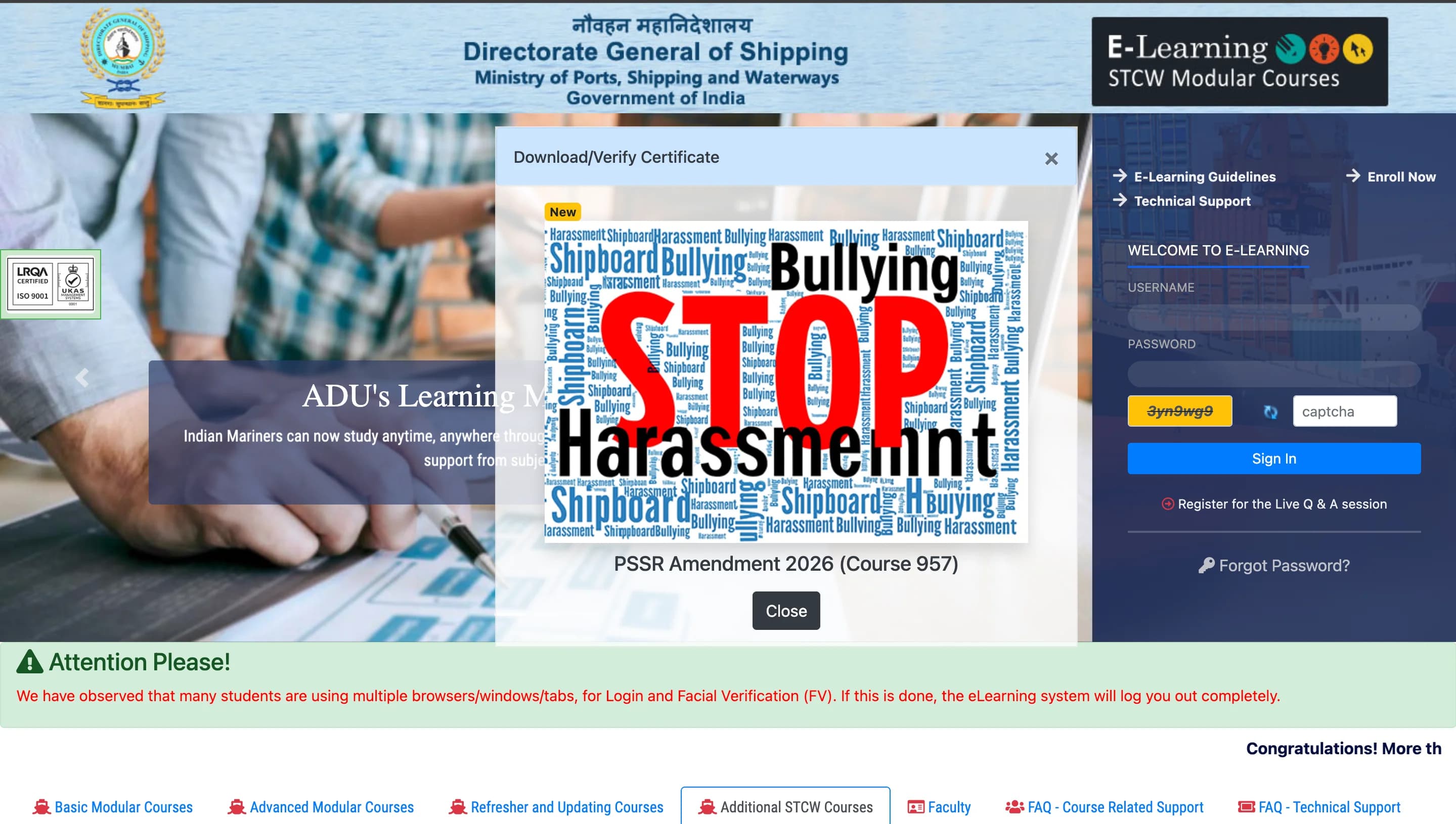
Step 2: Open the PSSR Amendment 2026 Certificate Page
On the portal, look for the certificate download or verification page for:
PSSR Amendment 2026
Course ID: 957
This is the page used to download or verify the PSSR Amendment certificate.
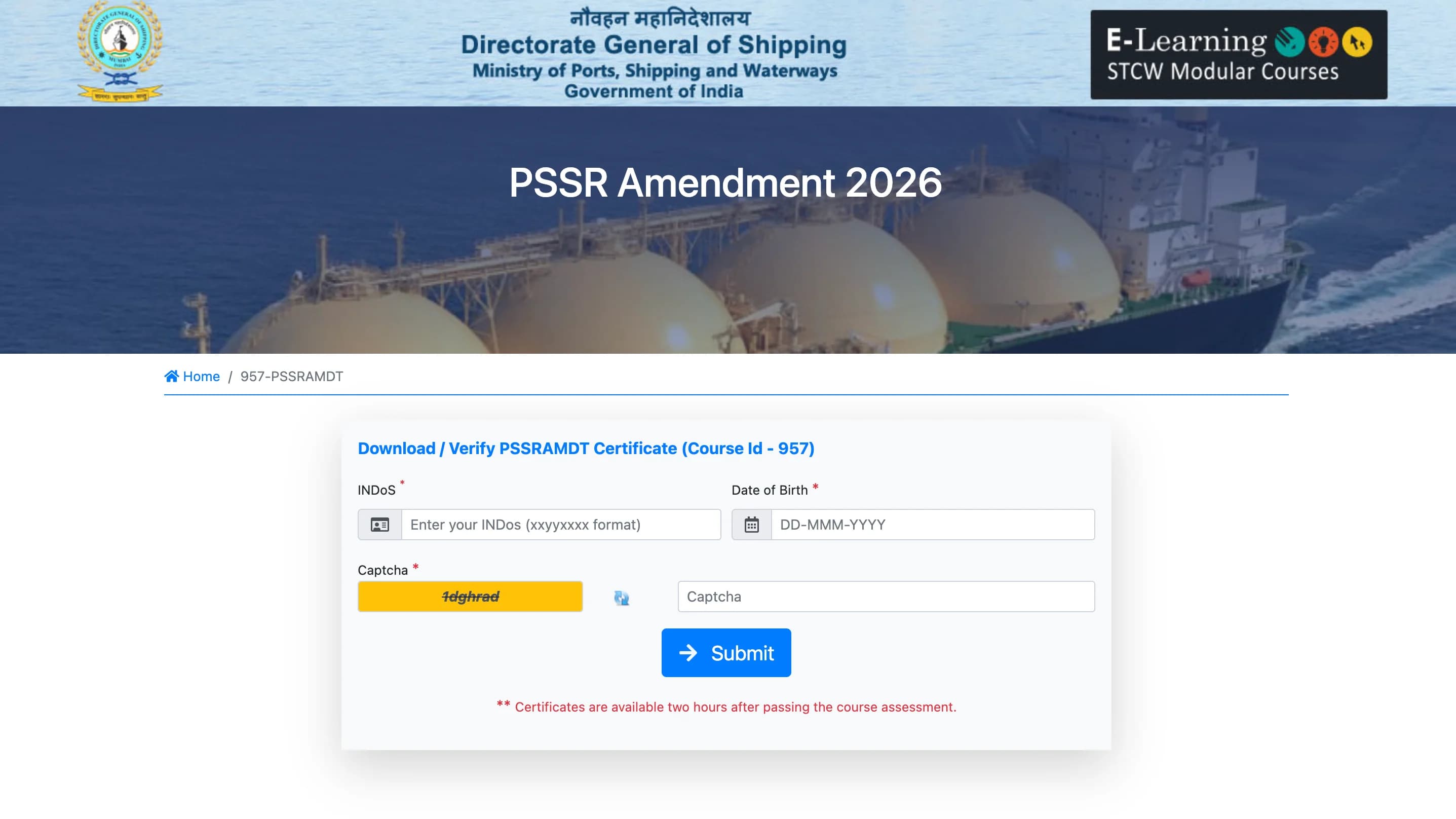
Step 3: Enter Your INDoS Number
Enter your INDoS number correctly.
Do not add extra spaces before or after the number. If your INDoS number is entered incorrectly, your certificate may not appear.
Step 4: Enter Your Date of Birth
Enter your date of birth in the format shown on the portal.
Check the format carefully before submitting. A wrong date format is one of the common reasons why seafarers face download errors.
Step 5: Enter the Captcha
Enter the captcha code shown on the screen.
If the captcha is not clear, refresh it and enter the new captcha carefully.
Step 6: Click on Submit
After entering all details, click on the Submit button.
If your assessment is passed and the certificate is generated, your PSSR certificate will appear on the screen.
Step 7: Download the Certificate PDF
Once the certificate opens, click on the download option and save the PDF on your device.
You should also take a printout or keep a backup copy in your email, Google Drive, or phone storage.
When Will the PSSR Certificate Be Available?
The certificate is usually available after successful completion and passing of the assessment. If it does not appear immediately, wait for some time and try again later.
Do not keep trying again and again within a few minutes. Wait, then recheck using the correct INDoS number and date of birth.
What to Do If the PSSR Certificate Is Not Showing?
If your certificate is not showing, check these points:
1. Assessment Not Passed
Your certificate will not be available if you have not successfully passed the final assessment.
2. Wrong INDoS Number
Recheck your INDoS number. Even one wrong digit can stop the certificate from appearing.
3. Wrong Date of Birth Format
Enter your date of birth exactly as required by the portal.
4. Certificate Not Generated Yet
Sometimes certificate generation may take time after passing the assessment. Wait and try again later.
5. Browser Issue
Use Google Chrome and clear your browser cache if the page is not loading properly.
6. Portal Server Issue
If the portal is slow or not opening, try again after some time.
Difference Between PSSR Certificate and PSSR Amendment Certificate
Many seafarers get confused between the normal PSSR certificate and the PSSR Amendment 2026 certificate.
The original PSSR certificate is part of Basic Safety Training and is usually issued after completing the approved course process.
The PSSR Amendment 2026 certificate is an additional completion certificate for the updated module. It should be kept along with your existing BST/PSSR certificate.
Important Tips Before Downloading
Use only the official DGS-linked portal.
Keep your INDoS number ready.
Enter your date of birth carefully.
Use Google Chrome for better compatibility.
Save the PDF in multiple places.
Do not edit or modify the certificate PDF.
Keep it attached with your BST/PSSR certificate when required.
Common Problems and Solutions
Problem: Certificate not found
Solution: Wait for certificate generation and recheck your INDoS number and date of birth.
Problem: Captcha error
Solution: Refresh the captcha and enter it again carefully.
Problem: Page not loading
Solution: Try Google Chrome, clear cache, or check again after some time.
Problem: Wrong details showing
Solution: Check your seafarer profile details and contact the official support channel if required.
Problem: PDF not downloading
Solution: Disable pop-up blocker, try another browser, or use a laptop instead of mobile.
FAQs on Latest PSSR Certificate PDF Download
1. Can I download the PSSR certificate PDF online?
Yes, once you complete the required course and pass the assessment, you can download the certificate PDF online through the official DGS-linked portal.
2. What is Course ID 957?
Course ID 957 is related to the PSSR Amendment 2026 e-learning module.
3. Is the PSSR Amendment certificate the same as the original PSSR certificate?
No. The PSSR Amendment certificate is an additional completion certificate. It should be kept with your original BST/PSSR certificate.
4. What details are required to download the certificate?
You need your INDoS number, date of birth, and captcha.
5. What should I do if my certificate is not showing?
First, check whether you have passed the assessment. Then recheck your INDoS number and date of birth. If the issue continues, contact the official support channel.
Final Words
Downloading the latest PSSR certificate PDF is simple if you follow the correct steps. Complete the PSSR Amendment 2026 course, pass the assessment, open the official certificate download page, enter your INDoS number and date of birth, and download your certificate PDF.
Keep this certificate safely with your Basic Safety Training or PSSR certificate, because it may be required during joining, company document verification, or future maritime documentation checks.