
How to Download STCW Course Certificate Online from DG Shipping
Introduction
After completing an STCW course, many seafarers want to download their certificate online but do not know the correct process.
The good news is that STCW course certificates can be checked and downloaded online through the DG Shipping certificate verification system. You only need your INDoS number and date of birth to search and download the certificate.
In this blog, we will explain the complete step-by-step procedure to download your STCW course certificate online.
What Is an STCW Course Certificate?
STCW stands for Standards of Training, Certification and Watchkeeping.
STCW courses are mandatory safety and competency-related courses for seafarers. After completing an approved STCW course from a DG Shipping-approved Maritime Training Institute, the certificate details are updated online.
These certificates may be required for:
Joining ship
Company document verification
CDC process
RPSL documentation
Visa or flag documentation
Maritime job applications
Future course admission
That is why every seafarer should know how to download and keep a copy of their STCW certificate.
Details Required to Download STCW Certificate
Before starting the download process, keep these details ready:
INDoS number
Date of birth
Mobile phone or laptop
Internet connection
PDF viewer or browser
Correct certificate/course details
Make sure your INDoS number and date of birth are entered correctly. Even one wrong digit can show no result.
Step-by-Step Procedure to Download STCW Course Certificate
Step 1: Visit the DG Shipping Website
First, open the official DG Shipping website in your browser.
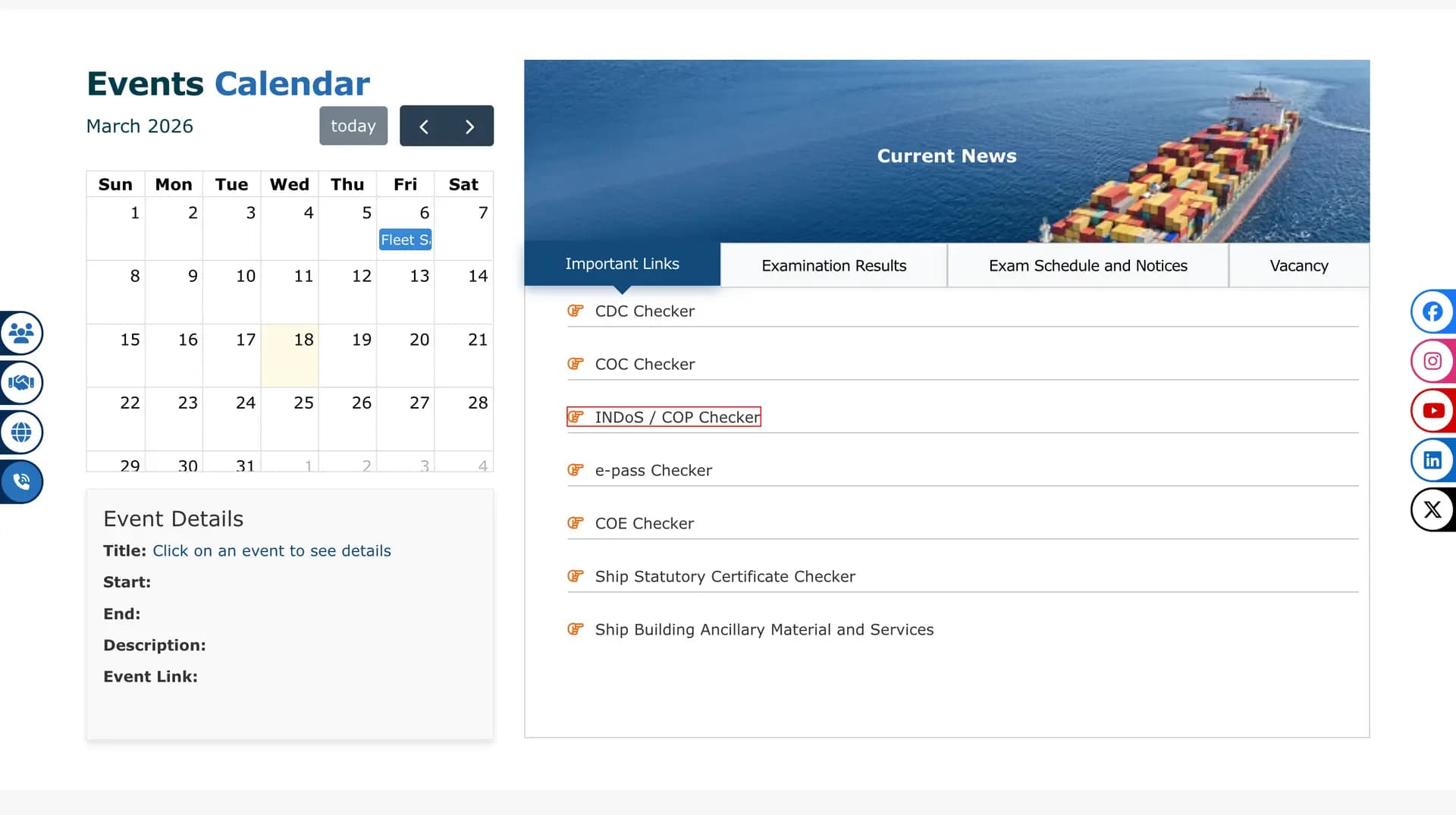
Always use the official DG Shipping website only. Do not use random third-party links for downloading or checking certificates.
Step 2: Click on INDoS / COP Checker
On the DG Shipping website, look for the option called:
INDoS / COP Checker
This option is used to check seafarer certificate details, including STCW course certificates.
Click on the INDoS / COP Checker option.
Step 3: Select STCW Course from the Drop-Down Menu
After opening the checker page, you will see a drop-down menu.
From the drop-down list, select:
STCW Course
This is important. If you select the wrong option, your STCW certificate may not appear.
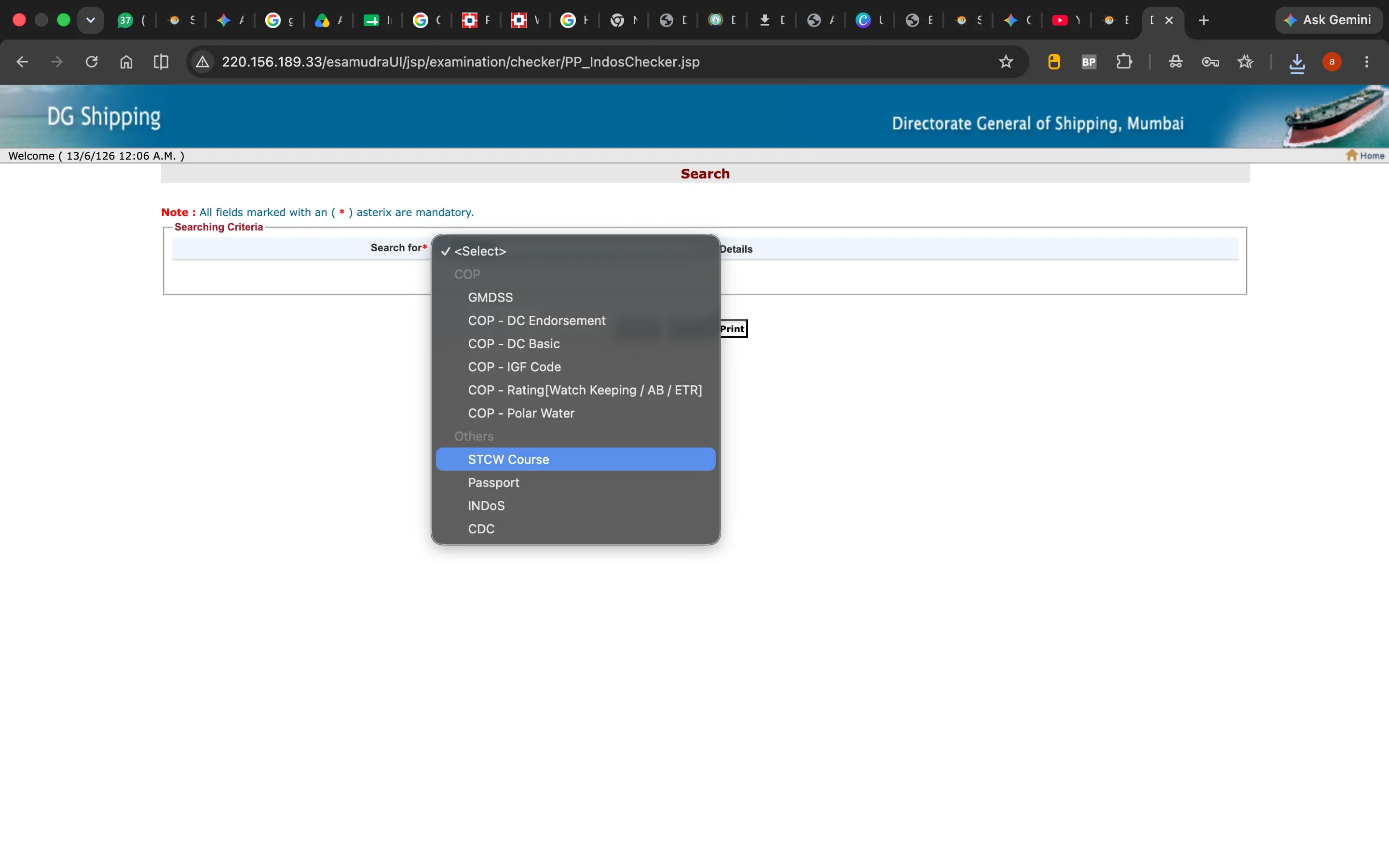
Step 4: Enter Your INDoS Number
Now enter your INDoS number carefully.
Check the number before submitting. Do not add any extra space before or after the INDoS number.
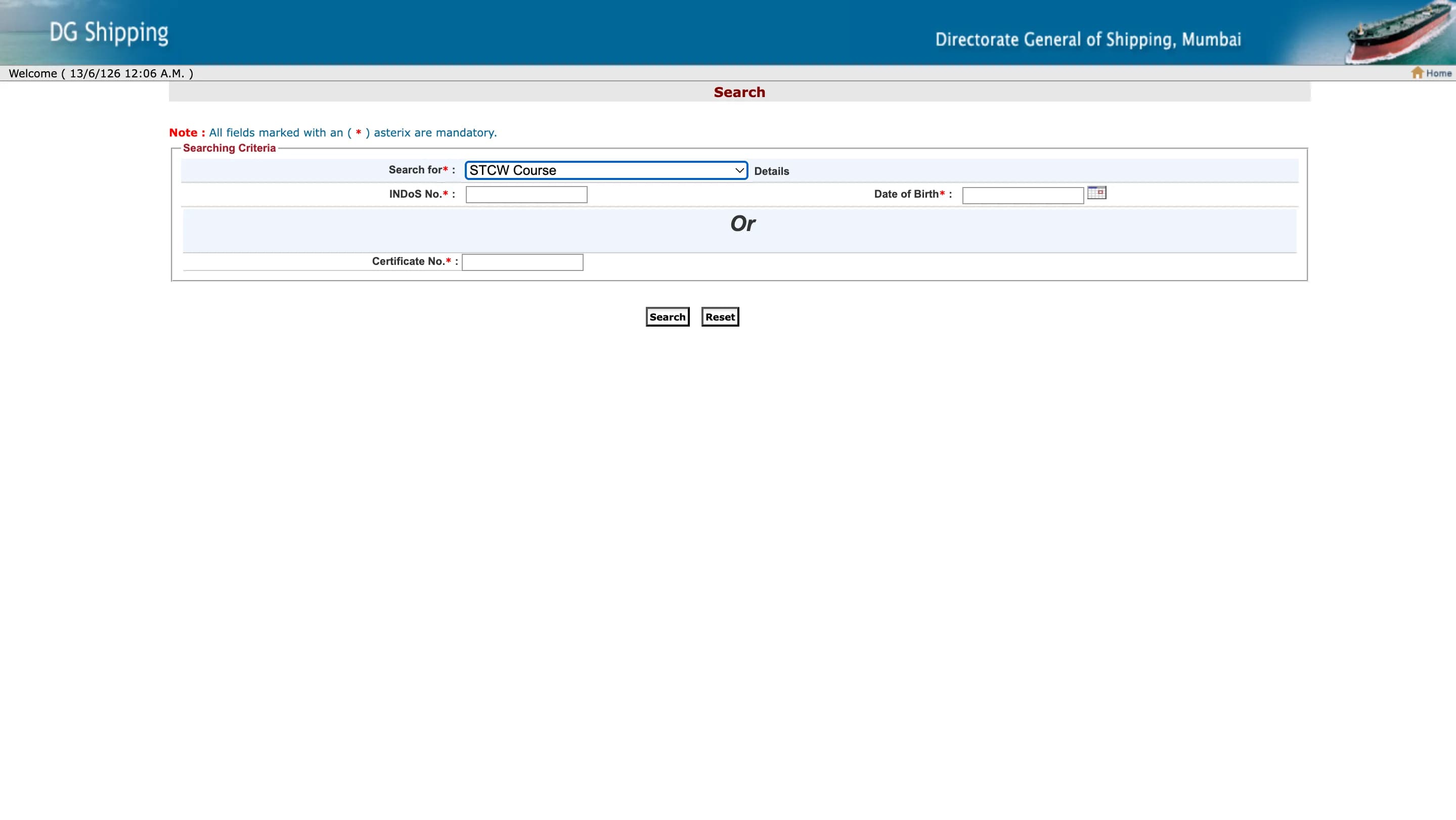
Step 5: Enter Your Date of Birth
After entering your INDoS number, enter your date of birth in the required format.
Make sure the date of birth matches your INDoS record. If the date of birth is wrong, the system may not show your certificate.
Step 6: Click on Search
After entering the required details, click on the Search button.
The system will search your STCW course certificate records linked with your INDoS number.
Step 7: Locate Your STCW Certificate
After clicking Search, your available STCW course certificate details will appear on the screen.
You may see details such as:
Course name
Institute name
Certificate number
Course completion date
Certificate issue details
Find the certificate you want to download.
Step 8: Click on the Certificate Number
Once you locate the correct certificate, click on the Certificate Number.
After clicking the certificate number, your STCW certificate will open on the screen.
Step 9: Download or Save the Certificate PDF
Once the certificate opens, save it to your device.
You can:
Download the PDF
Save it on your phone
Save it on your laptop
Upload it to Google Drive
Keep a copy in your email
Take a printout if required
It is always better to keep both a digital copy and a printed copy for future use.
Common STCW Courses You Can Check Online
You can usually check certificates for STCW modular courses such as:
PST — Personal Survival Techniques
FPFF — Fire Prevention and Fire Fighting
EFA — Elementary First Aid
PSSR — Personal Safety and Social Responsibilities
STSDSD — Security Training for Seafarers with Designated Security Duties
PSCRB — Proficiency in Survival Craft and Rescue Boats
AFF — Advanced Fire Fighting
MFA — Medical First Aid
Medical Care
Refresher courses
Availability depends on whether the certificate has been updated in the DG Shipping system.
What to Do If Your STCW Certificate Is Not Showing?
Sometimes the certificate may not appear immediately. If your STCW certificate is not showing, check the following points:
1. Check Your INDoS Number
Make sure your INDoS number is entered correctly.
A small typing mistake can stop your certificate from appearing.
2. Check Your Date of Birth
Enter the date of birth exactly as required by the system.
If your date of birth does not match your INDoS record, the certificate may not show.
3. Select the Correct Option
Make sure you selected STCW Course from the drop-down menu.
If you select another option, your STCW course certificate will not appear.
4. Wait for Certificate Update
If you recently completed the course, the certificate may take some time to reflect online.
Wait for the institute or system update and check again later.
5. Contact Your Maritime Training Institute
If your certificate is still not visible, contact the Maritime Training Institute where you completed the course.
Ask them whether your course completion details have been uploaded properly.
6. Try Another Browser
Sometimes the website may not work properly on one browser.
Try using:
Google Chrome
Microsoft Edge
Mozilla Firefox
You can also try using a laptop instead of a mobile phone.
Important Tips for Seafarers
Before downloading your STCW certificate, remember these points:
Always use the official DG Shipping website.
Keep your INDoS number ready.
Enter your date of birth carefully.
Select STCW Course from the drop-down menu.
Click on the correct certificate number.
Save the certificate PDF safely.
Keep backup copies in email and cloud storage.
Do not edit or modify the certificate PDF.
Share the certificate only when required for official use.
Why STCW Certificate Download Is Important
Downloading your STCW certificate is important because many companies and authorities may ask for it during document verification.
Your STCW certificate proves that you have completed the required maritime safety training from an approved institute.
Without proper STCW certificates, seafarers may face issues during:
Ship joining
Company verification
Document submission
Course admission
CDC-related process
RPSL process
Flag state documentation
That is why every seafarer should keep their STCW certificates updated and easily available.
FAQs on STCW Course Certificate Download
1. Can I download my STCW certificate online?
Yes, you can check and download your STCW course certificate online through the DG Shipping certificate checker system.
2. What details are required to download an STCW certificate?
You need your INDoS number and date of birth.
3. Where can I check my STCW certificate?
You can check it through the INDoS / COP Checker option available on the DG Shipping website.
4. Which option should I select in the drop-down menu?
You should select STCW Course from the drop-down menu.
5. What should I do if my STCW certificate is not showing?
First, check your INDoS number, date of birth, and selected option. If everything is correct and the certificate is still not showing, contact your Maritime Training Institute.
6. Can I download the certificate on mobile?
Yes, you can download it on mobile. However, if the page does not open properly, use a laptop or desktop.
7. Is the downloaded STCW certificate valid?
Yes, the certificate downloaded or verified through the official DG Shipping system is used for official verification purposes.
8. Can I download certificates for all STCW courses?
You can check certificates available under your INDoS record. If a certificate has not been updated online, you may need to contact your institute.
Final Words
Downloading your STCW course certificate online is a simple process if you follow the correct steps.
Visit the official DG Shipping website, open the INDoS / COP Checker, select STCW Course, enter your INDoS number and date of birth, click Search, open the certificate number, and save the certificate to your device.
Every seafarer should keep their STCW certificate PDF safely stored for future use, because it may be required during ship joining, company verification, and maritime documentation.